> ## Documentation Index
> Fetch the complete documentation index at: https://zenml.mintlify.site/llms.txt
> Use this file to discover all available pages before exploring further.
# Stacks
> How to configure MLOps tooling and infrastructure with stacks
Machine learning in production is not just about designing and training models. It is a fractured space consisting of a wide variety of tasks ranging from experiment tracking to orchestration, from model deployment to monitoring, from drift detection to feature stores and much, much more than that. Even though there are already some seemingly well-established solutions for these tasks, it can become increasingly difficult to establish a running production system in a reliable and modular manner once all these solutions are brought together.
This is a problem which is especially critical when switching from a research setting to a production setting. Due to a lack of standards, the time and resources invested in proof of concepts frequently go completely to waste, because the initial system can not easily be transferred to a production-grade setting.
At **ZenML**, we believe that this is one of the most important and challenging problems in the field of MLOps, and it can be solved with a set of standards and well-structured abstractions. Owing to the nature of MLOps, it is essential that these abstractions not only cover concepts such as pipelines and steps but also the infrastructure elements on which the pipelines run.
Taking this into consideration, ZenML provides additional abstractions that help you simplify infrastructure configuration and management:
* [Stacks](/starter-guide/stacks#stack): A combination of various MLOps *stack components*.
* [Stack Components](/starter-guide/stacks#stack-components): Configuration of MLOps tools, which come in different *categories* and *flavors*.
* [Flavors](/starter-guide/stacks#stack-component-flavors): Represent a concrete implementation of a stack component.
Let's discuss each in further detail:
## Stack
In ZenML, a **Stack** represents a set of configurations for your MLOps tools and infrastructure. For instance, you might want to:
* Orchestrate your ML workflows with [Kubeflow](/component-gallery/orchestrators/kubeflow),
* Save ML artifacts in an [Amazon S3](/component-gallery/artifact-stores/amazon-s3) bucket,
* Track your experiments with [Weights & Biases](/component-gallery/experiment-trackers/wandb),
* Deploy models on Kubernetes with [Seldon](/component-gallery/model-deployers/seldon) or [KServe](/component-gallery/model-deployers/kserve),
In the illustration, you see one user register two stacks, the `Local Stack` and a `Production Stack`. These stacks can be shared with other people easily - something we'll dig into more [later](/starter-guide/collaborate).
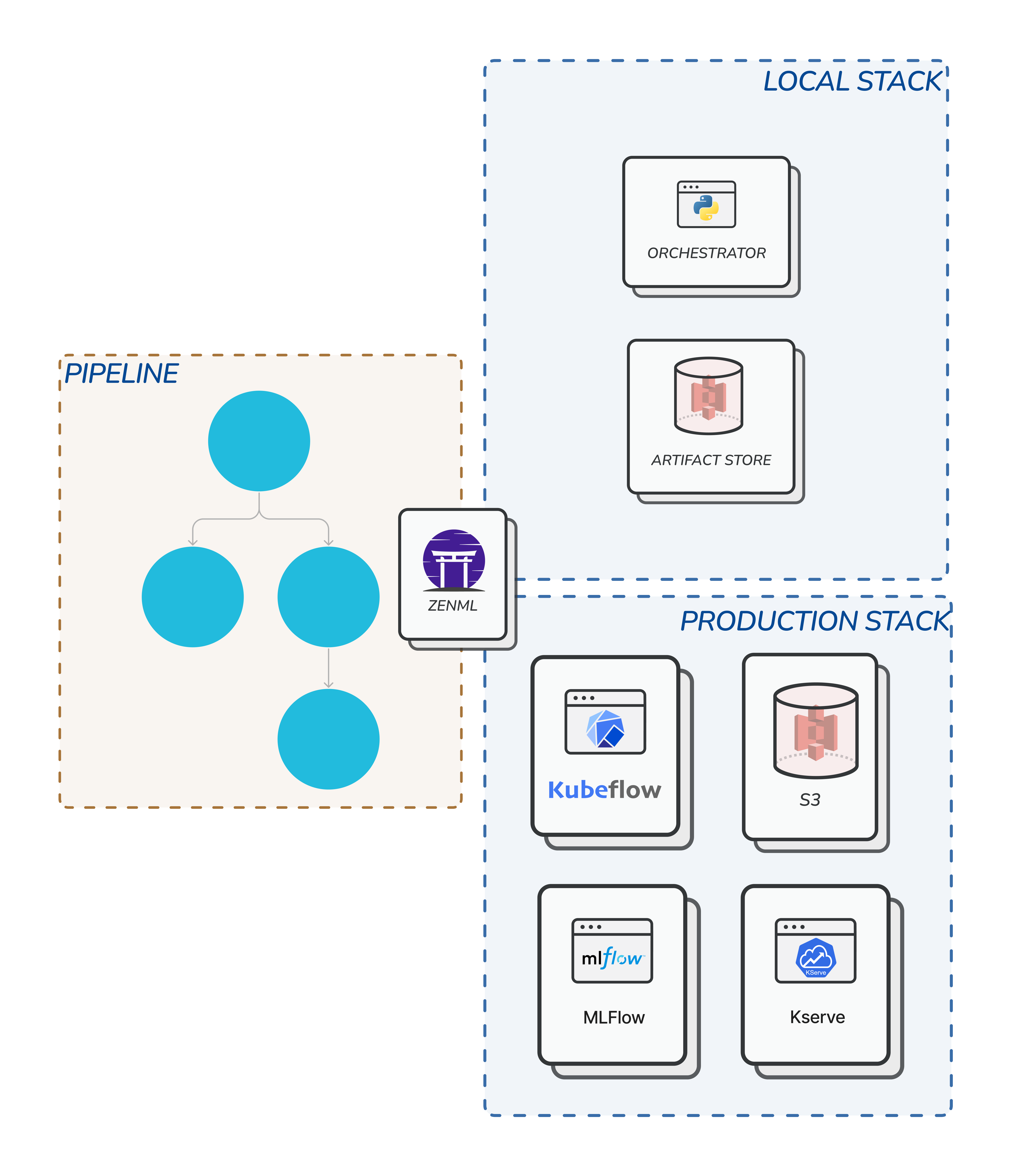
Any such combination of tools and infrastructure can be registered as a separate stack in ZenML. Since ZenML code is tooling-independent, you can switch between stacks with a single command and then automatically execute your ML workflows on the desired stack without having to modify your code.
### The Default Stack
By default, every ZenML project that you create already come with an initial active `default` stack. If you followed the code examples in the [Steps and Pipelines](/starter-guide/pipelines) section, then you have already used this stack implicitly to run all of your pipelines.
This stack features two stack components:
* A [Local Orchestrator](/component-gallery/orchestrators/local),
* A [Local Artifact Store](/component-gallery/artifact-stores/local),
Speaking of stack components...
## Stack Components
In ZenML, each MLOps tool is associated to a specific **Stack Component**, which is responsible for one specific task of your ML workflow. All stack components are grouped into [categories](/component-gallery/categories).
For instance, each ZenML stack (e.g. the default stack above) includes an *Orchestrator* which is responsible for the execution of the steps within your pipeline, an *Artifact Store* which is responsible for storing the artifacts generated by your pipelines.
Check out the [Categories of MLOps Tools](/component-gallery/categories) page
for a detailed overview of available stack components in ZenML.
### Orchestrator
The [Orchestrator](/component-gallery/orchestrators) is the component that defines how and where each pipeline step is executed when calling `pipeline.run()`. By [default](/component-gallery/orchestrators/local), all runs are executed locally, but by configuring a different orchestrator you can, e.g., automatically execute your ML workflows on [Kubeflow](/component-gallery/orchestrators/kubeflow) instead.
### Artifact Stores
Under the hood, all the artifacts in our ML pipeline are automatically stored in an [Artifact Store](/component-gallery/artifact-stores). By [default](/component-gallery/artifact-stores/local), this is simply a place in your local file system, but we could also configure ZenML to store this data in a cloud bucket like [Amazon S3](/component-gallery/artifact-stores/amazon-s3) or any other place instead.
You can see all supported stack component types in a single table view [here](/component-gallery/categories)
Every stack can usually contain one stack component category of each type,
e.g., one `Orchestrator`, one `Artifact Store`, etc, but in some cases, you
can have more than one stack component category in one stack (e.g. in the case
of having two `Step Operators` in your stack). We will discuss this in later
chapters.
## Stack Component Flavors
The specific tool you are using is called a **Flavor** of the stack component. E.g., *Kubeflow* is a flavor of the *Orchestrator* stack component category.
Out-of-the-box, ZenML already comes with a wide variety of flavors, which are either built-in or enabled through the installation of specific [Integrations](/component-gallery/integrations).
## Listing Stacks, Stack Components, and Flavors
Our CLI features a wide variety of commands that let you manage and use your
stacks. If you would like to learn more, please run: "`zenml stack --help`" or
visit [our CLI docs](https://apidocs.zenml.io/latest/cli/).
You can see a list of all your *registered* stacks with the following command:
```sh
zenml stack list
```
Similarly, you can see all *registered* stack components of a specific type using `zenml list`, e.g.:
```sh
zenml orchestrator list
```
In order to see all the *available* flavors for a specific stack component use `zenml flavor list`, e.g.:
```sh
zenml orchestrator flavor list
```
You can also see details of configuration parameters available for a flavor with `zenml flavor describe `, e.g.:
```sh
zenml orchestrator flavor describe kubeflow
```